

If Skyrim shows an "enginefixes.dll couldn't load plugin" or "enginefixes.dll couldn't load plugin 7e" error, the problem is usually related to version mismatches, missing runtime components, corrupted mod files, or security software interference. These errors commonly appear when SKSE64, Skyrim SE or AE, and SSE Engine Fixes are not fully compatible with one another. This guide explains several practical ways to fix enginefixes.dll loading problems.
Common Causes of enginefixes.dll Errors
Mismatched Skyrim and SKSE versions
Outdated Visual C++ Redistributables
Missing .NET Framework dependencies
Corrupted or missing DLL files
Incorrect mod load order
Antivirus or security software interference
Driver conflicts on Windows
Fix 1: Match SKSE Version with Skyrim Build
A frequent cause of the error is an SKSE64 version mismatch. Each version of Skyrim SE or AE requires a specific SKSE64 build.
Check your Skyrim version in Steam by right-clicking the game → Properties → Installed files.
Download the corresponding SKSE64 build from the official SKSE website.
Replace outdated SKSE files in your Skyrim folder.
Relaunch the game and test.
Ensuring exact compatibility between Skyrim and SKSE often resolves the issue instantly.
Fix 2: Install Required Visual C++ Redistributables
The enginefixes.dll file depends on certain Visual C++ Redistributables. If these are missing or outdated, you will see the "couldn't load plugin" error.
Download the latest Visual C++ Redistributable (x64) from Microsoft's official site.
Install both the 2015–2019 Redistributables.
Restart your PC.

After updating, the DLL will have the runtime libraries it needs to load properly.
Fix 3: Update or Reinstall .NET Framework
Some mods rely on .NET Framework 4.8 or higher. Without it, the game may fail to initialize enginefixes.dll.
Visit Microsoft's .NET Framework download page.
Install the latest supported version.
Reboot your PC.
This ensures compatibility with the DLL's functions.
Fix 4: Repair or Replace Corrupted DLL Files
If the DLL itself is corrupted, you need to repair or replace it.
Navigate to your Skyrim SE/AE root folder.
Delete the problematic enginefixes.dll file.
Download a fresh copy from the mod's official Nexus Mods page.
Place it back into the SKSE/Plugins folder.
This eliminates corruption and restores functionality.
Fix 5: Use Driver Talent
Manually troubleshooting DLL problems can be time-consuming. Driver Talent is a professional tool that can scan, repair, and replace broken or missing DLL files automatically.
How to Use Driver Talent to Fix enginefixes.dll Errors:
Download and install Driver Talent.
Launch the program and click Scan.

Review detected DLL and driver issues.
Click Repair to fix missing or corrupted DLLs.
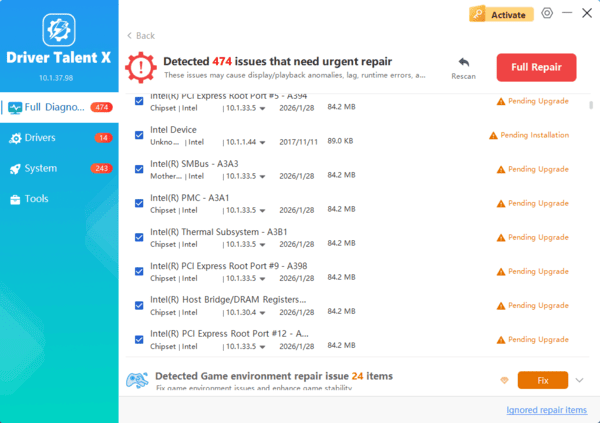
Restart your PC and relaunch Skyrim.
By letting Driver Talent handle DLL-related problems, you can quickly eliminate the "enginefixes.dll couldn't load plugin" error without manual file hunting.
Frequently Asked Questions
How do I know which SSE Engine Fixes version to install?
Match the versions of Skyrim, SKSE64, Address Library, and SSE Engine Fixes exactly. Check Skyrim's executable version rather than relying only on whether it is labeled SE or AE.
Where should enginefixes.dll be installed?
The file normally belongs in the SKSE plugins directory, typically Data\SKSE\Plugins. Other Engine Fixes components may need installation in Skyrim's root folder according to the mod's official instructions.
Can load order fix an enginefixes.dll loading error?
Usually not. DLL-loading errors occur before a normal plugin load order can solve them. Check version compatibility, required dependencies, installation paths, and antivirus quarantine first.
Conclusion
The "enginefixes.dll couldn't load plugin" and "enginefixes.dll couldn't load plugin 7e" errors in Skyrim usually stem from mismatched versions, missing dependencies, or corrupted DLL files. By updating SKSE64, Visual C++ Redistributables, .NET Framework, and game files, most issues can be resolved quickly.
For a more efficient solution, using Driver Talent is highly recommended. With its ability to repair DLL errors, update drivers, and optimize system stability, it ensures that Skyrim runs smoothly with all your pc.
