

If a game fails to launch with a "libstdc++-6.dll is missing" or "libstdc++-6.dll not found" error, the problem is usually related to a damaged game installation, missing runtime components, antivirus interference, or an incompatible DLL version. Because libstdc++-6.dll is required by many games and applications built with GNU C++ libraries, downloading random copies from third-party DLL websites can create additional compatibility or security problems. This guide explains several practical ways to fix libstdc++-6.dll errors, including repairing DLL files with Driver Talent, verifying game files, updating graphics drivers and DirectX, reinstalling runtime components, and replacing the DLL manually only when necessary.
What is libstdc++-6.dll?
Part of the GNU Standard C++ Library.
Required by games built with MinGW or cross-compiled engines.
Provides critical functions for game logic and rendering.
Without it, games fail to launch or crash on startup.
Causes of libstdc++-6.dll Errors in Games
✅ Corrupted or missing DLL due to incomplete installs or antivirus false positives
✅ Outdated game dependencies (DirectX, Visual C++, or GPU drivers)
✅ Manual DLL downloads from unsafe sources leading to mismatched versions
✅ Damaged game files in Steam, Epic Games, or GOG installs
Solutions to Fix libstdc++-6.dll Errors
1. Verify Game Files on Steam/Epic
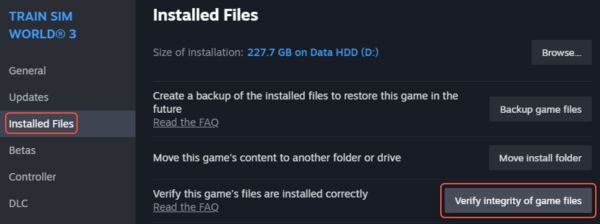
On Steam: Right-click the game → Properties → Installed Files → Verify integrity.
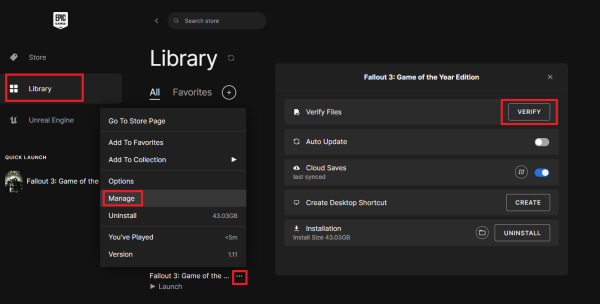
On Epic Games: Go to Library → click the three dots under the game → Manage → Verify.
2. Update GPU Drivers and DirectX
Update via NVIDIA GeForce Experience or AMD Adrenalin.
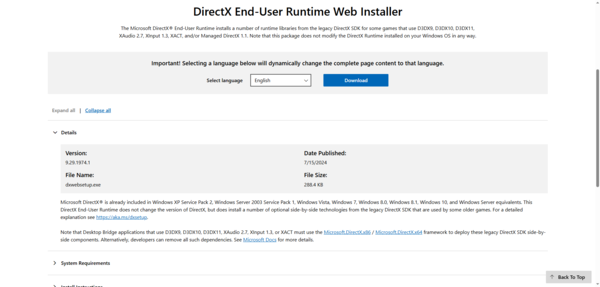
Install the latest DirectX Runtime from Microsoft.
3. Reinstall Visual C++ Redistributables
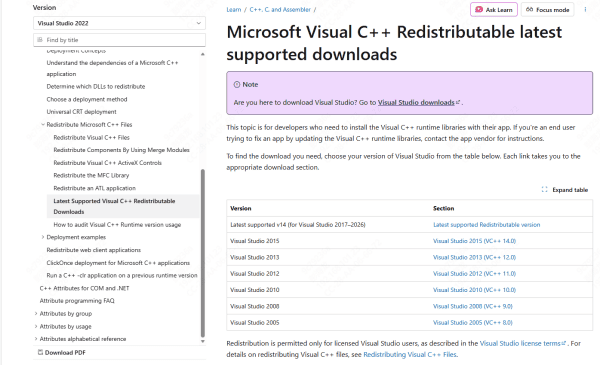
Download the latest x86 and x64 Visual C++ Redistributables from Microsoft's website.
Install and reboot your PC.
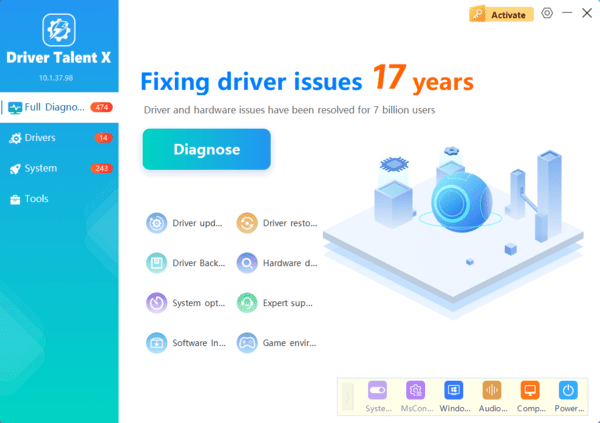
4. Use Driver Talent
Driver Talent can fix dll errors with one click.
Steps:
Download and install Driver Talent.
Run a full system scan.
Select Repair DLL and let it fix libstdc++-6.dll.
Restart your PC and relaunch the game.
5. Manual DLL Replacement
If you must, only download DLLs from trusted sources (developer or included game files). Place it in:
C:\Windows\System32\ (for 64-bit Windows)
Or directly in the game's installation folder
Frequently Asked Questions
Is libstdc++-6.dll included with Microsoft Visual C++ Redistributable?
Usually not. It belongs to the GNU C++ runtime commonly distributed with MinGW-based applications. The affected game or software installer should normally provide the correct version.
Where should libstdc++-6.dll be placed?
The safest location is usually the affected application’s installation folder, beside its executable file. Avoid copying it into Windows system folders unless the software developer specifically instructs you to do so.
Can antivirus software remove libstdc++-6.dll?
Yes. Security software may quarantine the file after detecting suspicious or modified game files. Review the quarantine history and restore it only if the game came from a trusted source.
Final Thoughts
The libstdc++-6.dll missing error is usually caused by damaged game files, antivirus quarantine, or an incompatible runtime file. Begin by verifying or reinstalling the affected game through its official launcher, then check your security software and update relevant system components. Driver Talent can also help identify DLL and driver-related problems. Avoid downloading random DLL copies or placing them in Windows system folders, as the wrong version may introduce further errors or security risks.
