

If you encounter a "vcruntime140_1.dll is missing" or "vcruntime140_1.dll was not found" error when launching a game or application, the problem is usually related to a damaged or incomplete Microsoft Visual C++ Redistributable installation, corrupted system files, or missing runtime components. Instead of downloading DLL files from unknown websites, it is safer to restore the required components through official or trusted repair methods. This guide explains several practical ways to fix vcruntime140_1.dll errors, including reinstalling the Visual C++ Redistributable, running System File Checker, manually replacing the correct 32-bit or 64-bit DLL when necessary, and using Driver Talent for automatic DLL repair.
What is vcruntime140_1.dll?
The vcruntime140_1.dll file is a crucial component of the Microsoft Visual C++ Redistributable package. It ensures applications developed using Visual Studio can run smoothly on Windows systems. Without it, programs trigger errors such as:
"vcruntime140_1.dll is missing."
"Cannot continue, vcruntime140_1.dll was not found."
"The code execution cannot proceed because vcruntime140_1.dll was not found."
This DLL is part of the Visual Studio 2015–2019 redistributables and is essential for compatibility with modern apps and games.
Causes of vcruntime140_1.dll Errors
Before moving into fixes, it's important to understand why vcruntime140_1.dll download becomes necessary. Common causes include:
Accidental file deletion.
Corrupted or outdated Visual C++ Redistributable installation.
Incomplete Windows updates.
Malware infections or corrupted system files.
How to Download vcruntime140_1.dll Safely
Not all DLL download sources are trustworthy. Downloading random files from third-party websites may harm your system. Instead, use the following reliable methods to get the correct vcruntime140_1.dll 64-bit or 32-bit file.
1. Download via Microsoft Visual C++ Redistributable Package
The official and safest way to restore the missing DLL file is to reinstall the Microsoft Visual C++ Redistributable.
Steps:
Visit Microsoft's official website.
Download the latest supported version of the Visual C++ Redistributable for Visual Studio 2015–2019.
Choose vc_redist.x64.exe for 64-bit systems and vc_redist.x86.exe for 32-bit systems.
Install and restart your PC.

This method ensures Windows replaces missing or corrupted vcruntime140_1.dll files automatically.
2. Use Windows System File Checker (SFC)
If your DLL file is corrupted, SFC can help repair it.
Steps:
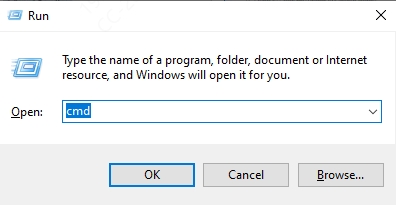
Press Windows + R, type cmd, and press Ctrl + Shift + Enter to open Command Prompt as Administrator.
Enter the command: sfc /scannow
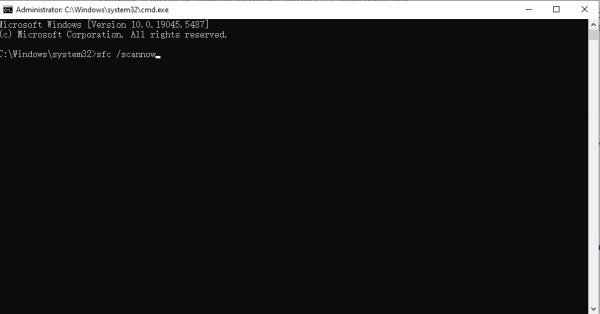
Wait for Windows to scan and repair corrupted files.
After the scan, restart your PC to check if the issue is resolved.
3. Manual vcruntime140_1.dll Download (64-bit and 32-bit)
For advanced users, manual replacement may help if system repair tools fail.
Steps:
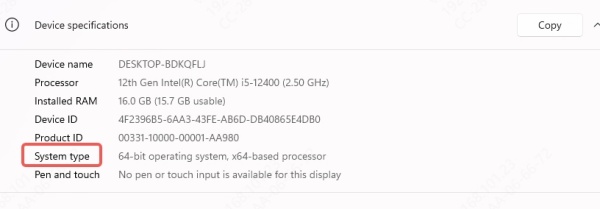
Identify your system architecture (64-bit or 32-bit).
Right-click This PC → Properties → check “System type.”
Download the correct vcruntime140_1.dll file.
Place the file in the application's installation folder (usually under C:\Program Files or C:\Program Files (x86)).
Alternatively, copy the DLL into C:\Windows\System32 for 64-bit or C:\Windows\SysWOW64 for 32-bit.
Restart your computer.
Caution: Only download DLLs from verified and safe repositories. Malicious files may compromise your PC's security.
4. Fix DLL Errors Automatically with Driver Talent
If you're tired of manually searching, downloading, and replacing DLL files, we recommend using Driver Talent, a professional system utility that can automatically detect and repair DLL-related issues.
Key Features of Driver Talent:
Automatic detection of missing or corrupted DLL files, including vcruntime140_1.dll.
One-click fix for DLL errors without risky manual downloads.
Keeps drivers and system libraries updated, reducing compatibility problems.
Simple interface suitable for both beginners and experts.
How to Use Driver Talent to Fix vcruntime140_1.dll Errors:
Download and install Driver Talent.
Run a full scan to detect corrupted or missing DLL files.
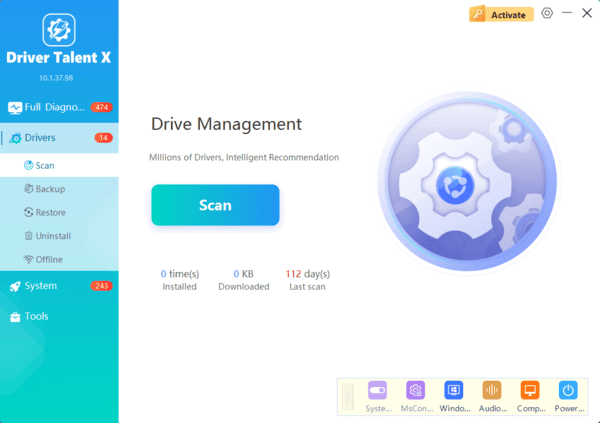
Click Repair to automatically replace the correct vcruntime140_1.dll.
Restart your PC to complete the fix.
This approach is ideal if you want a hassle-free solution to not only DLL issues but also outdated drivers that often trigger performance problems.
Frequently Asked Questions
Is it safe to download vcruntime140_1.dll from a DLL website?
No. Individual DLL files from third-party sites may be outdated, incompatible, or malicious. Reinstall the official Microsoft Visual C++ Redistributable instead.
Should I install the x86 or x64 Visual C++ Redistributable?
On 64-bit Windows, install both versions because 32-bit applications require the x86 package, while 64-bit applications use the x64 package. On 32-bit Windows, install only x86.
Do I need to register vcruntime140_1.dll with regsvr32?
No. This runtime library is not normally registered with regsvr32. Installing or repairing the Visual C++ Redistributable places and configures it correctly.
Why does the error remain after reinstalling the Redistributable?
The application installation may be damaged, antivirus software may have quarantined a file, or Windows components may be corrupted. Repair the application, run SFC and DISM, and then reinstall it if necessary.
Conclusion
The vcruntime140_1.dll missing error is one of the most common Windows issues, preventing users from running apps or games smoothly. The best solutions include reinstalling the Microsoft Visual C++ Redistributable, running SFC scans, or performing a manual vcruntime140_1.dll download (64-bit or 32-bit).
For users who prefer an automatic and reliable method, Driver Talent stands out as the easiest solution to repair DLL files and update drivers. With its built-in DLL error fix feature, it ensures your system runs smoothly without manual troubleshooting.
