

The NVIDIA 5070 graphics card delivers powerful performance for gaming, creative workloads, and professional applications, but driver-related problems can still affect its stability and functionality. Issues such as system crashes, reduced performance, display glitches, or missing NVIDIA Control Panel features may occur when the graphics driver is outdated, corrupted, or incorrectly installed. NVIDIA 5070 driver problems can be caused by various factors, including failed installations, Windows update conflicts, leftover files from previous drivers, incompatible versions, or corrupted downloads. In this guide, we'll provide fast and effective solutions to troubleshoot NVIDIA 5070 driver issues, update drivers correctly, and keep your system stable while getting the best possible GPU performance.
Recognize Common NVIDIA 5070 Driver Problems
Users often experience frequent system crashes or Blue Screen of Death (BSOD) after installing new drivers
Performance in games or professional applications may drop unexpectedly, or you may notice graphical glitches, flickering, or artifacts on your screen
Sometimes, the NVIDIA Control Panel may fail to open or certain options might be missing. Recognizing these symptoms early helps you determine whether the issue is driver-related and choose the most effective solution
Clean Uninstall of Existing NVIDIA Drivers
Old drivers or leftover files can conflict with new installations
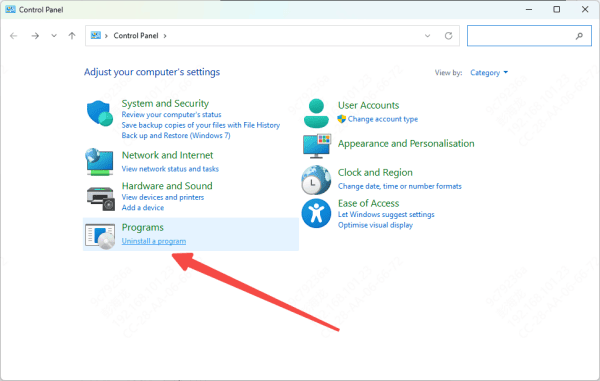
Begin by uninstalling all NVIDIA software through the Control Panel
If problems persist, consider using Display Driver Uninstaller (DDU) in Safe Mode
This step is particularly important if you've previously experienced failed installations or errors during updates
Update NVIDIA 5070 Drivers
Once the system is clean, download the latest NVIDIA 5070 driver from the official NVIDIA website
Choose the Custom Installation option and select Perform Clean Installation
This resets all previous driver settings, removes old profiles, and ensures a clean environment

Close all background programs, temporarily disable antivirus if necessary, and carefully follow the on-screen prompts
After installation, restart your system to ensure all changes take effect
If the standard installer fails, you can also use Device Manager to manually install the driver by browsing for the correct version
This method is often helpful when installation errors persist

Use Driver Talent X for Faster Resolution
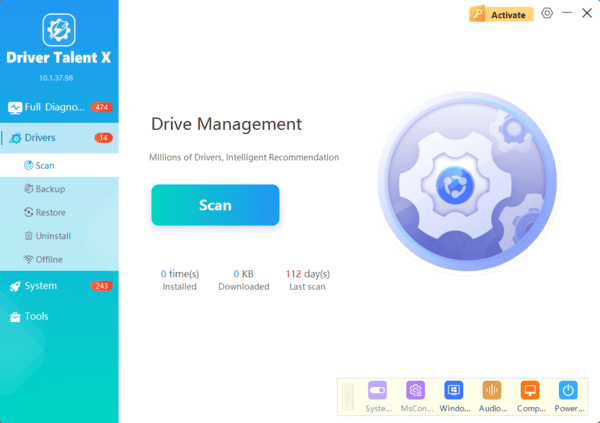
For users who want a fast, reliable solution, professional tools like Driver Talent X can simplify the process.
Adjust Windows and Security Settings
Sometimes antivirus software or firewall settings interfere with driver downloads or installation
Temporarily disabling these programs can prevent the driver from being blocked
Additionally, check Windows Update for conflicting driver updates and create a system restore point before making changes
These precautions provide a safety net and allow you to recover quickly if anything goes wrong during installation
Prevent Future NVIDIA Driver Issues
Avoid beta or unofficial drivers unless necessary, as they may cause instability
Keep your GPU BIOS, operating system, and essential software updated. After each update, test system stability and monitor performance in games or professional applications
Consistent maintenance and proactive updates reduce the likelihood of future NVIDIA 5070 driver issues and help maintain optimal performance over time
Conclusion
NVIDIA 5070 driver issues can be frustrating, but they are generally easy to fix with the right approach. By recognizing common problems, checking system compatibility, performing a clean uninstall, updating drivers properly, and leveraging one-click repair tools like Driver Talent X, you can restore stable performance quickly. Combining manual troubleshooting with automated tools and preventive maintenance ensures your NVIDIA 5070 graphics card remains reliable, fast, and fully functional for gaming, creative work, and professional tasks. Even complex issues can be resolved efficiently and safely, giving you confidence that your GPU will always perform at its peak.
